Microsoft Edge: AI browser APK
Microsoft Corporation
284 MB
Android 11 and up
10m+
142.0.3595.107
Description
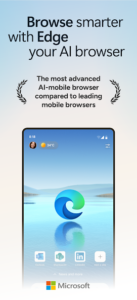
Microsoft Edge for Android has become one of the most reliable and fast browsers available today. With built-in AI support, enhanced privacy controls, ad-blocking options, and a smooth interface, it offers everything a modern Android user needs for smarter browsing. Whether the goal is work, study, entertainment, or daily internet use, Edge delivers a powerful performance with features that make it different from ordinary mobile browsers. If you want a browser that is fast, secure, and AI-powered, Microsoft Edge is one of the best options to install on your Android phone.
Introduction to Microsoft Edge for Android
Microsoft Edge is not just another browser; it is a complete browsing system built for speed, security, and intelligent assistance. Microsoft designed Edge with the intention of giving Android users a consistent and fast web experience without unnecessary lag. Its AI-powered features allow users to search smartly, summarize pages, translate content instantly, and get quick answers while browsing. Unlike many browsers that consume heavy storage or drain battery quickly, Edge is optimized to run smoothly on low-spec and high-spec Android devices.
This browser also maintains a clean interface that is simple to use for beginners while offering advanced tools for users who want deeper productivity. From syncing your bookmarks to accessing your saved passwords across different devices, Edge ensures everything remains connected with your Microsoft account.
Why Microsoft Edge Is an AI Browser
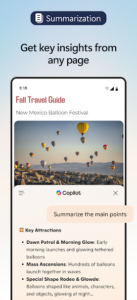
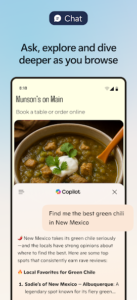
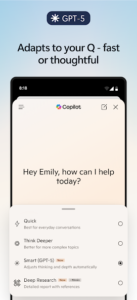
The biggest highlight of this app is its integration with AI. Microsoft Edge comes with built-in AI assistance powered through cloud-based intelligent tools. These features include page summarization, translation, rewriting assistance, and instant web answers. For students, researchers, and professionals, the AI tools can simplify tasks like reading long articles, understanding complex topics, or searching across multiple websites efficiently.
If you are someone who likes to work quickly, the AI sidebar in Edge becomes a helpful companion. It can analyze the page you are browsing and provide a summary, create short explanations, or extract important points from any content. These features make it one of the most powerful AI-enabled browsers available on Android at no cost.
Speed and Performance
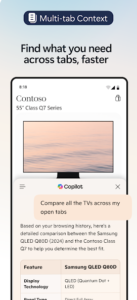
Microsoft Edge has been optimized to load websites faster than many traditional browsers. The lightweight engine ensures reduced page-loading time, meaning you can browse websites smoothly even on slower internet connections. The browser has a strong memory-management system, which prevents lagging or freezing, especially when multiple tabs are open.
Android users who multitask heavily will appreciate how smoothly Edge handles browsing sessions. Whether streaming videos, downloading files, or navigating between tabs, the performance remains consistent. This makes the browser an excellent choice for mobile users who need speed without compromising quality or security.
Privacy and Security Protection
One of the core priorities of Microsoft Edge is user privacy. The browser comes with tracking prevention that blocks harmful trackers and protects your online identity. With three levels of privacy control, you can choose how much protection you want during browsing. Edge also alerts you if your saved passwords appear in a leaked database, helping you stay ahead of potential security risks.
Its built-in ad-blocking option enhances the browsing experience by removing annoying pop-ups, banners, and third-party ads. This not only makes pages load faster but also protects against unwanted scripts that can slow down devices or compromise privacy. Unlike many browsers, Edge does not force users to install external extensions for basic security needs because all essential protections are built in.
Sync Across Devices
One of the biggest advantages of using Microsoft Edge on Android is the ability to sync your data across different devices. Whether you use Windows, Mac, or another phone, Edge keeps your bookmarks, passwords, collections, and browsing history synchronized. This allows a seamless browsing experience when switching between a phone and a computer.
For users who work or study across multiple devices, this feature is extremely helpful. You do not need to manually transfer data or re-enter login information. Everything remains connected through your Microsoft account.
Built-in Tools and Smart Features
Microsoft Edge is known for offering a variety of tools that make everyday browsing easier. One of its most popular features is the “Collections” tool that lets users save web pages, notes, images, and links in one place for later use. It works like a digital organizer and becomes useful for planning research projects, storing shopping links, or preparing work-related documents.
Another impressive feature is its immersive reading mode. This mode transforms long articles into a clean reading page by removing unnecessary elements. This makes reading easier on mobile screens and improves focus. For people who like listening instead of reading, Edge provides a read-aloud feature that narrates the content in a natural voice.
Downloading Microsoft Edge for Android
Downloading Microsoft Edge on your Android phone is very simple. The browser is officially available on the Google Play Store, making it safe and trustworthy. You do not need to download the app from any third-party website or unknown source. Just search the name in the Play Store, and you will find the latest version available for installation.
Because it receives regular updates, new features, security improvements, and AI enhancements continue to improve the app over time. This also ensures the browser stays compatible with the latest Android versions.
User Experience and Design
Microsoft Edge provides a clean and modern design that fits well with Android devices. Menus are easy to understand, and navigation buttons are placed where most users expect them to be. Whether opening private tabs, managing downloads, or switching between pages, the overall design feels natural and intuitive. Unlike heavy browsers that crowd the interface with too many options, Edge keeps everything neat and balanced.
Its dark mode support also reduces eye strain and gives the browser a premium look. The layout adapts perfectly, whether you are using a smaller phone or a larger tablet.
Is Microsoft Edge Free?
Yes, Microsoft Edge is completely free for all Android users. There are no premium versions, no paid subscriptions, and no hidden costs. Every feature of the browser, including AI tools, privacy controls, syncing options, and ad-blocking, is available without payment.
This makes the browser a great option for users who want advanced features without spending money on premium applications.
Conclusion
Microsoft Edge: AI Browser for Android is an excellent choice for users who want a fast, intelligent, and secure browsing experience on mobile. With AI tools, privacy controls, syncing support, and smooth performance, it stands out as one of the best browsers available for Android today. Its free availability on the Google Play Store makes it accessible for everyone, whether for work, school, or daily web browsing. If you want an advanced browser that offers more than basic features, Microsoft Edge is worth downloading.
Images